
Comparison

Hanko vs PandaDoc: which is better for client billing?

PandaDoc is built around documents and e-signature workflow; Hanko is built around the ongoing client relationship — proposal, agreement, recurring invoice, and portal.

PandaDoc's strength is document workflow: e-signature, templates, and CRM integrations (Salesforce, HubSpot) for sales teams sending a high volume of proposals and contracts. It doesn't build a persistent client portal or recurring billing engine around what happens after a document is signed. Hanko is narrower on document/CRM depth but continues past the signature into recurring invoicing, payment reconciliation, and a client portal the client returns to.

 HankoPandaDoc
Best forService businesses billing the same clients repeatedlySales teams sending high document volume with CRM integrations
Proposals/documentsYesYes (core product)
E-signingYesYes (core product)
InvoicingLine items, taxes, recurring schedulesOne-time payment collection on a document
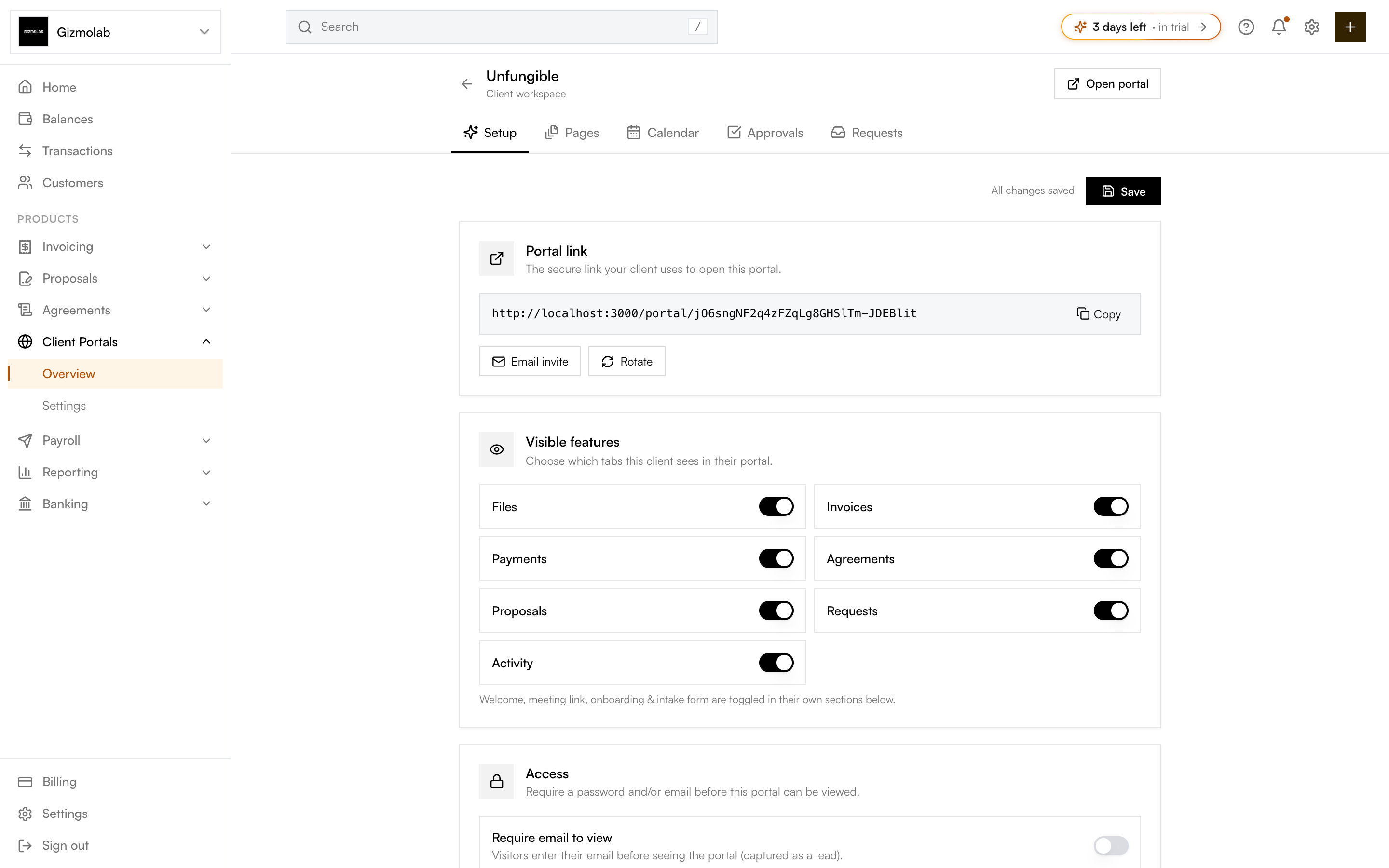
Client portalsYes, ongoing per-client historyNot a persistent portal — per-document workflow
Recurring billingYesNot a core feature
Stablecoin paymentsYesNot offered
CRM integrationsNot offeredSalesforce, HubSpot, and others
Starting price$19/mo flat$19/user/mo annual (Essentials)

Pricing checked September 2026. PandaDoc pricing cross-referenced across multiple independent sources as of September 2026, since PandaDoc's own pricing page returned rate-limiting during verification — confirm current tiers directly at pandadoc.com/pricing before quoting to a prospect. Hanko figures from Hanko's own pricing page.

Document workflow vs. client relationship

PandaDoc treats each proposal or contract largely as its own document to be signed and, optionally, paid once. Hanko treats a client as an ongoing record: the same client, proposal, agreement, and every invoice sent to them live together in one portal, rather than each document standing alone.

Payments and billing depth

PandaDoc collects a payment on a document via integrations with Stripe, PayPal, Square, or Authorize.net — useful for a one-time signature-plus-payment moment, but it isn't built as a recurring invoicing engine with line items, taxes, and billing schedules the way Hanko's invoicing is. Hanko also doesn't route through a third-party payment gateway integration for basic card/ACH — payment methods are built into the invoice itself, including a stablecoin option PandaDoc doesn't offer.

CRM integrations

This is a genuine PandaDoc strength: it integrates with Salesforce, HubSpot, and other CRMs that larger sales organizations already run their pipeline through. Hanko doesn't currently offer CRM integrations — for a sales team whose process depends on syncing documents to an existing CRM, PandaDoc fits that requirement and Hanko doesn't.

Pricing

PandaDoc's Essentials tier is reported at $19/user/month billed annually ($35/month billed monthly), with Business at $49/user/month annual. Both are per-seat, so cost scales directly with team size. Hanko's Starter is $19/month flat, and Pro is $49/month flat for up to 5 team members — for a small team, Hanko's flat pricing is likely cheaper than PandaDoc's per-seat Business tier, though the comparison depends on which PandaDoc tier your workflow actually requires.

Choose Hanko if

  • You bill the same clients repeatedly and want a portal that carries the relationship, not just one document
  • You want recurring invoicing with line items and taxes built in
  • You want a stablecoin payment option

Choose PandaDoc if

  • You run a sales team that needs Salesforce or HubSpot integration
  • Your workflow is mostly one-off documents needing a signature and a single payment
  • You send a high volume of documents and need PandaDoc's document-automation depth

Final verdict

Choose PandaDoc if your priority is document automation and CRM-connected e-signature at sales-team scale. Choose Hanko if you want the signed document to continue into recurring billing and a client portal instead of ending as a completed document.

Frequently asked questions

Does PandaDoc support recurring billing?

Recurring, scheduled invoicing isn't a core PandaDoc feature the way it is in Hanko. PandaDoc's payment integrations are built around collecting a payment on a document, typically a one-time transaction.

Does PandaDoc have a client portal?

Not in the sense of a persistent, ongoing space a client returns to across multiple documents and invoices. PandaDoc's workflow is centered on individual documents.

Is PandaDoc or Hanko cheaper for a 5-person team?

PandaDoc's tiers are priced per seat (around $19-$49/user/month reported), so a 5-person team multiplies that cost. Hanko's Pro plan is a flat $49/month for up to 5 team members. Confirm current PandaDoc pricing before comparing exact totals.

Does Hanko integrate with Salesforce or HubSpot?

Not currently. If CRM integration is a requirement, PandaDoc's integrations with Salesforce, HubSpot and similar tools are a genuine advantage over Hanko today.

Other comparisons

Keep the client after the document is signed

A signed agreement becomes the invoice, the recurring schedule, and the client's own portal — not just a completed document.

One account for proposals, agreements, invoices and client payments.

Get Started

Product updates and the occasional tip, about once a month.